Showing posts with label Pictures. Show all posts

Alternating Background Images

| Labels: , , , , , , | 13 comments |

Having the same picture for your background gets boring. I prefer a new one each time I log in, something cool I found out you can do on your mac.

To start, make a folder with all your desired background images. Call it something like "Backgrounds" and put it in your picture folder. This is going to be where you can put pictures you want to have as a background.

Now we can set up the background settings.

  1. Open up "System Preferences" > Desktop & Screen Saver.
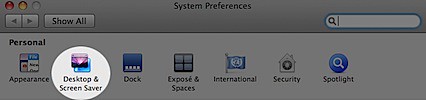
    System Preferences.jpg
  2. Make sure your in the "Desktop" section.

    Picture 2.png
  3. Add your "Backgrounds" folder by clicking the + button.
    Picture 3.png
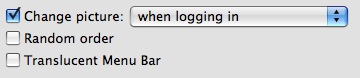
  4. Click the "Change Picture" checkbox and choose how often you want your background to alternate.
    Picture 1.png

And your done!

You can also select "Random Order" if you want as well as change how the picture is shown (such as "Fill Screen", "Tile", "Center", etc.).

Enjoy giving your computer a new look each time you login.
Add More Photo Booth Effects

| Labels: , , , , , , | 20 comments |

Ever since Apple started building in the iSight camera into all the Macs, they also added an application called Photo Booth.

For those that don't know, Photo Booth let's you take pictures with the iSight camera and add tons of cool effects while your at it.512 Photo Booth.png

Photo Booth now comes with 24 different photo and video effects. There fun, but why not add more?! Here are a couple Photo Booth add-ons that let you do just that.

  1. CatEye : 8 Cool Retro Effects For Photo Booth.
  2. iGlasses : iGlasses lets you change the video settings. Change the brightness, contrast, rotate the image and more!
  3. More iChat Effects : A free pack of 48 effects that work in both iChat and Photo Booth.

These should keep you entertained for a few months.

Have fun!

#9 - Clean Your Hardrive

| Labels: , , , , , , , , , , , , | 2 comments |

Something about Mac OSX is that, the more free space you have on your hard drive, the faster your computer runs.

MacHD.png

Cleaning out your hard drive is a great way to speed things up.

Go through your folders and look for things to delete. Stuff like...

  • Movies you don't watch.
  • Music you don't listen to.
  • Files you no longer need.
  • Pictures you don't really need (Things off the internet).
  • Applications you no longer use.
  • Duplicate Files.

And so on...

There are a few programs that can help you do this. They can tell you where the most space is being taken, what duplicate files you have and other things to help you clean things up.

I'll go over them in a different post.

The more free space you have the better.